UX audit
ROAS target: 18 findings, 21 laws, five refined screens
An expert review of the first redesign (v1) against Nielsen’s ten heuristics and 21 UX laws, followed by a refinement (v2). The brief: keep the original design recognisable, so the screens can be rebuilt in Figma without starting over.
Limits. This is a heuristic review of static screens, not user research. “Pass” means the design follows the law on paper. It still needs testing with users, and the test plan is at the end.
Usability findings
6 serious · 10 moderate · 2 minor
Addressed in v2
0 verified with users
Laws passed, of 21
1 not testable statically
Before and after
1. Target type
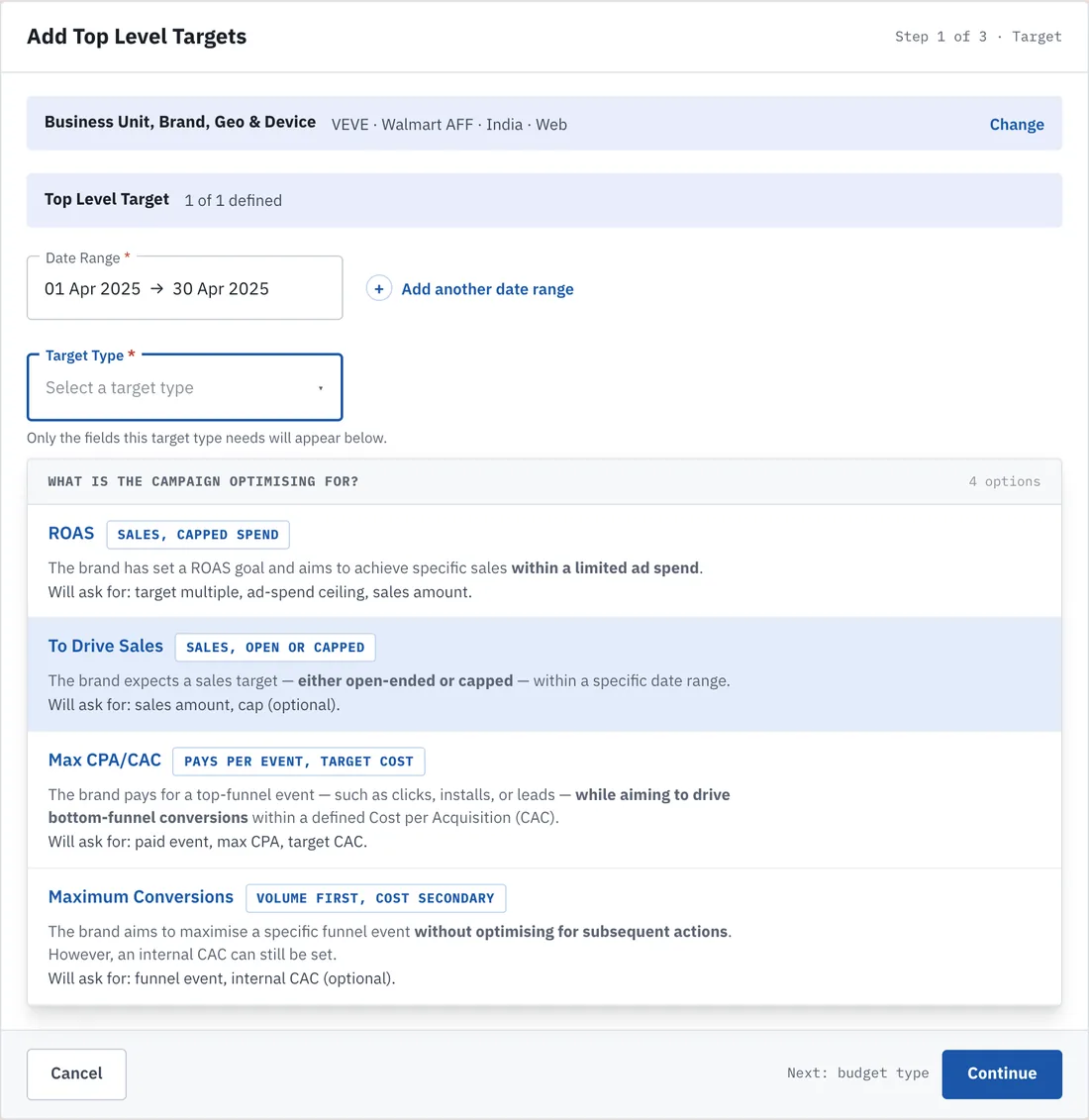
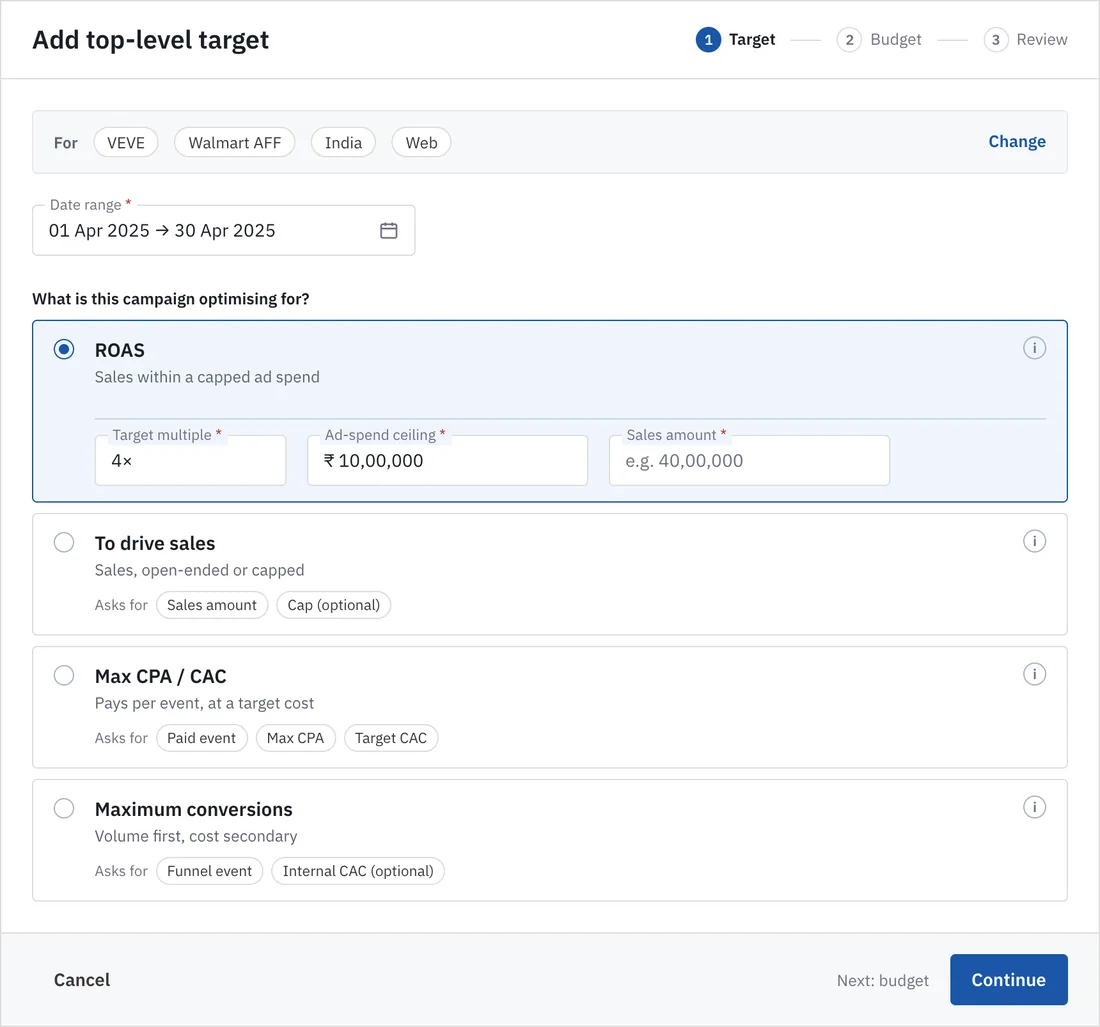
2. Tag inventory
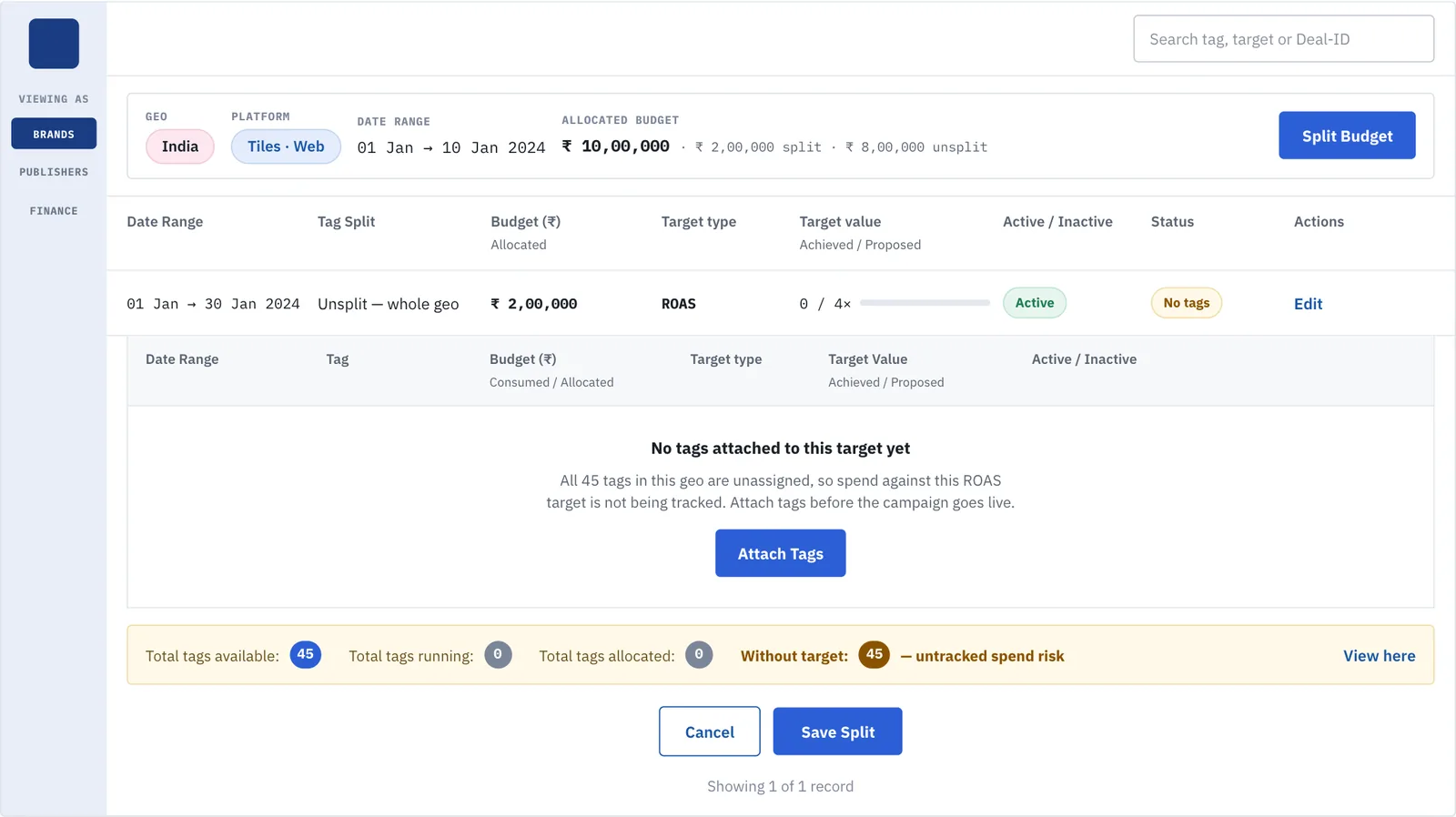
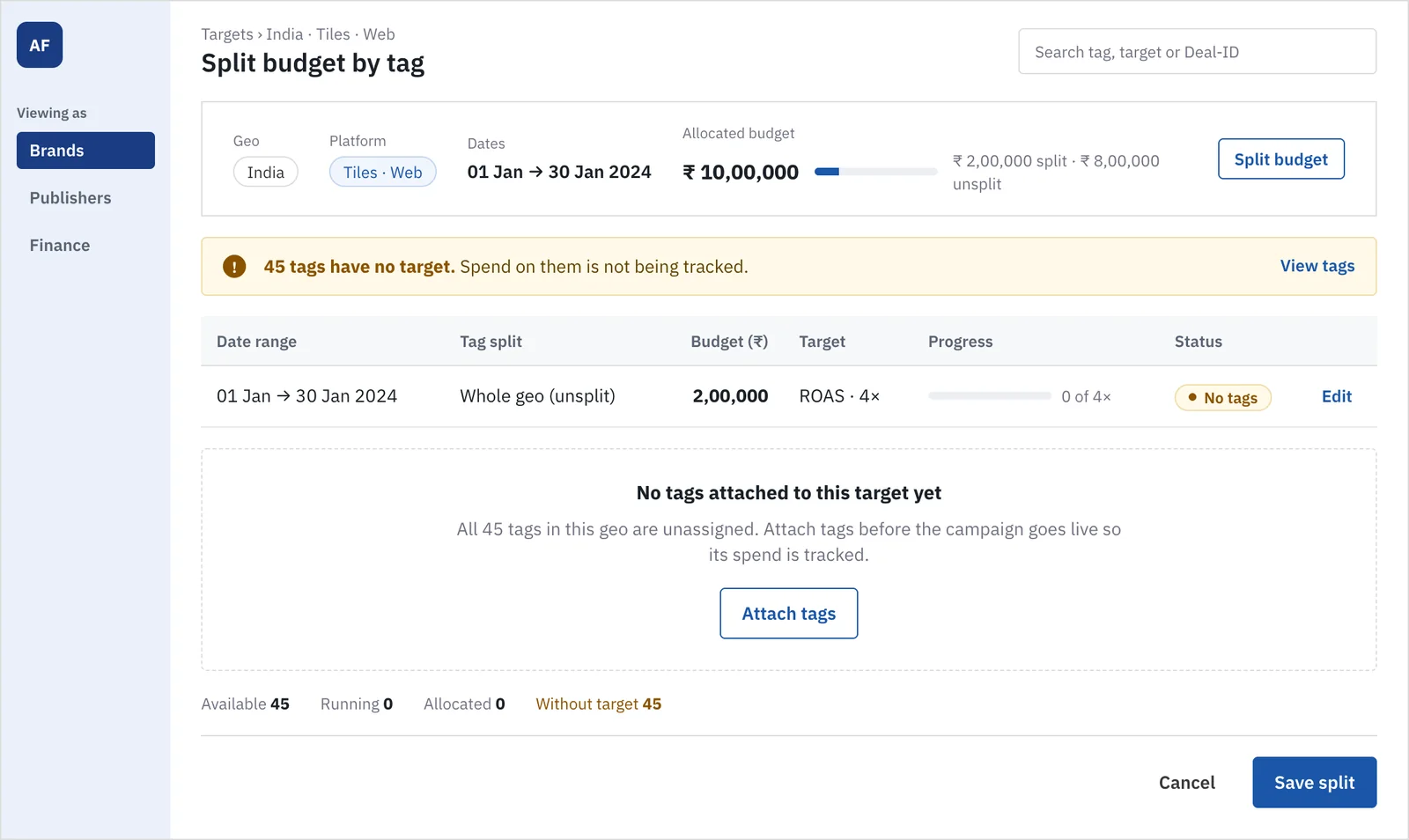
3. Deal-ID recovery
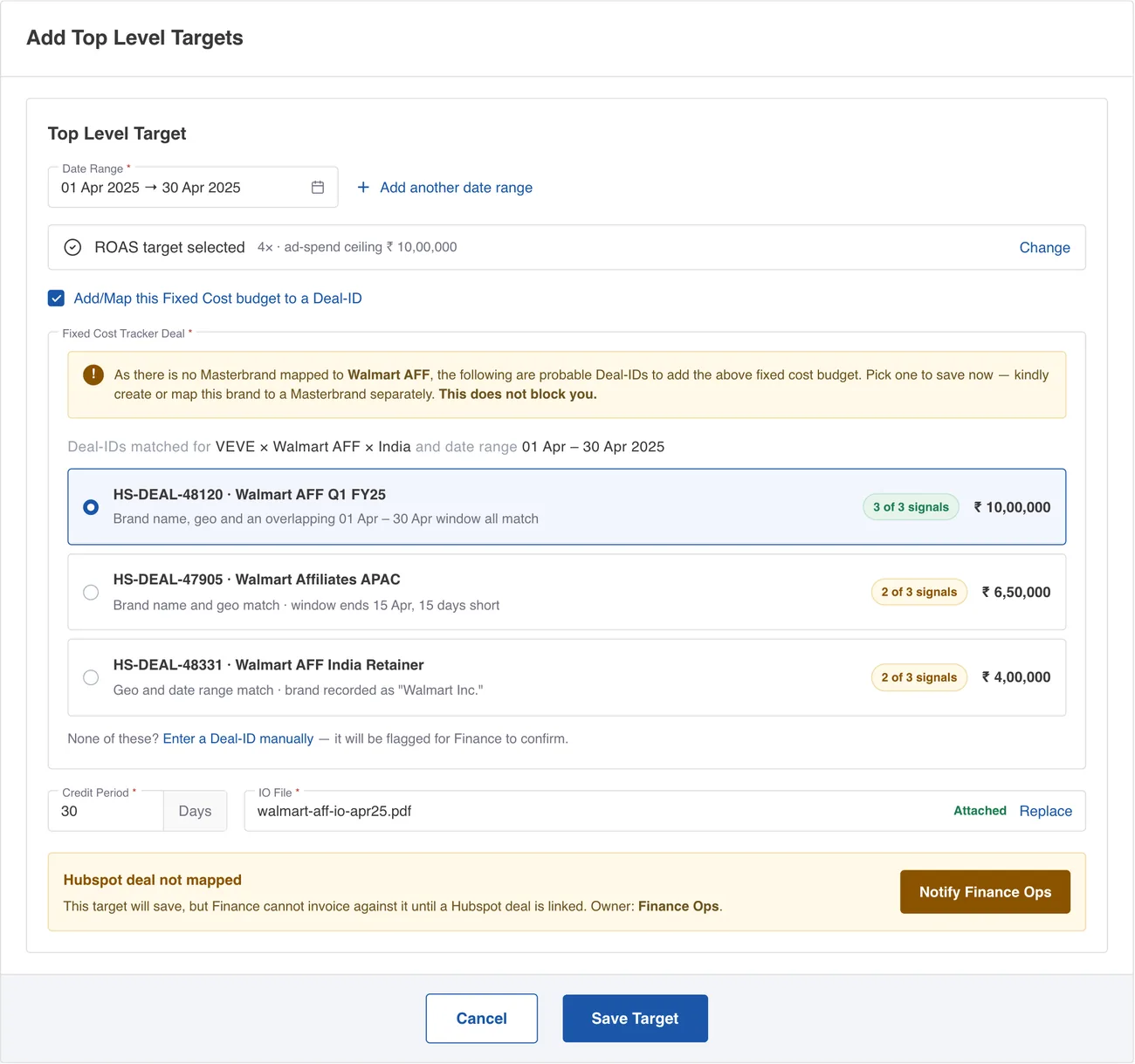
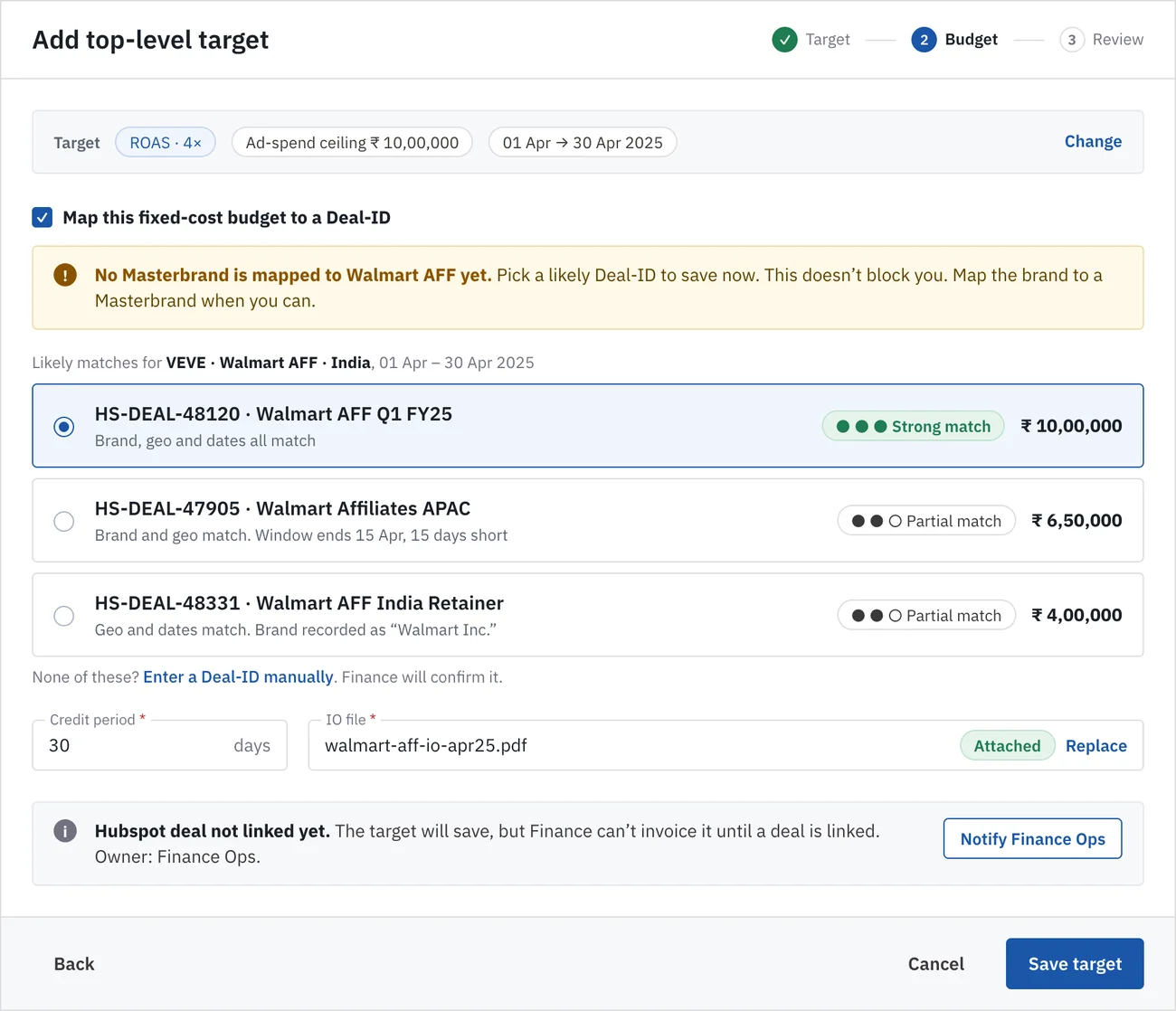
4. Hubspot deal
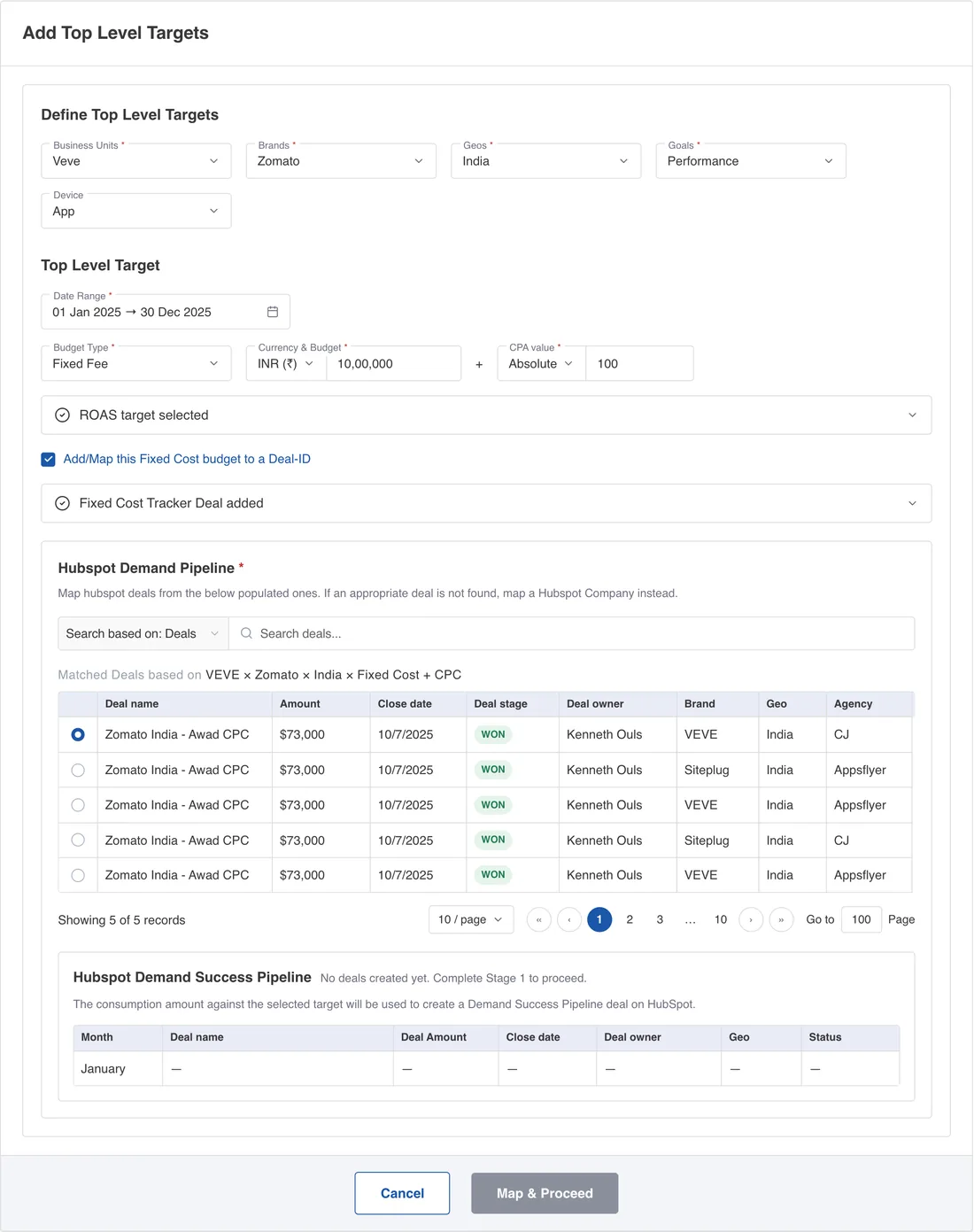
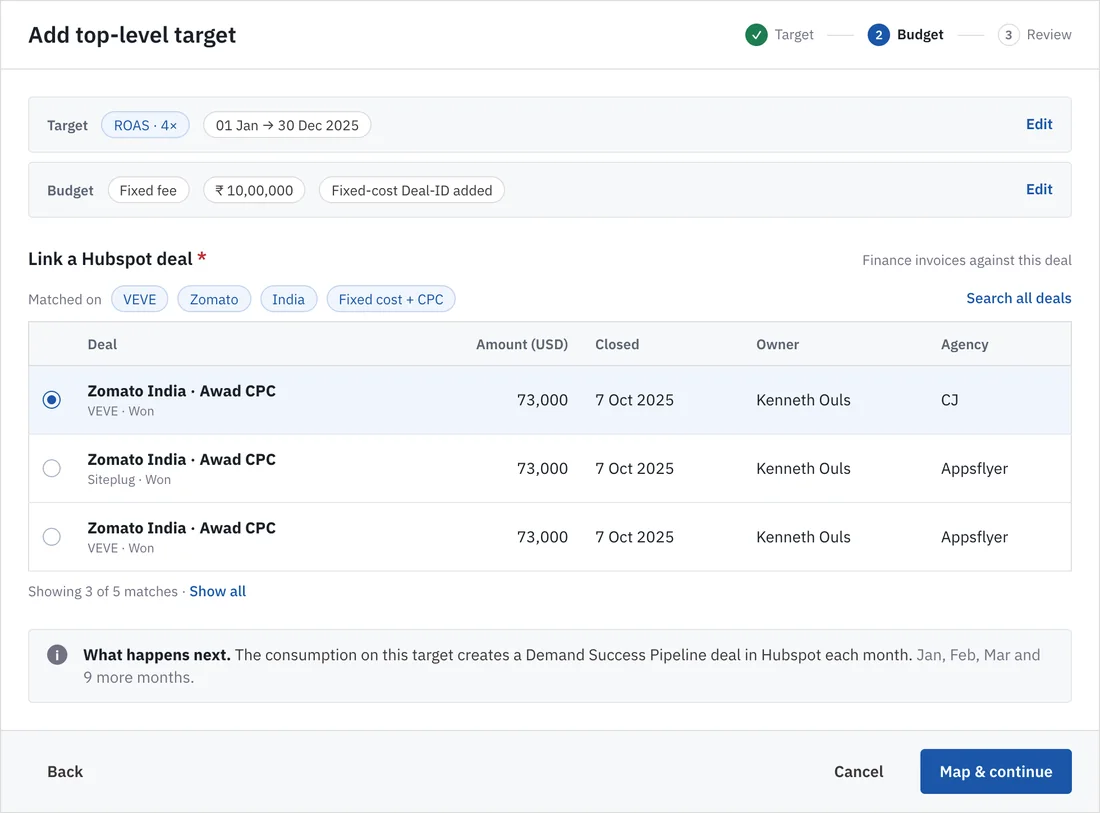
5. Target list
Usability findings
Severity uses Nielsen’s scale: 1 minor, 2 moderate, 3 serious.
| ID | Screen | Heuristic | Finding | Severity | Fix in v2 |
|---|---|---|---|---|---|
| F01 | 1 Target type | Aesthetic and minimalist design | Two stacked blue banners (context, then “Top Level Target, 1 of 1 defined”) carry equal weight and compete with the task. | 2 | One quiet context line. “1 of 1 defined” dropped; progress lives in the stepper. |
| F02 | 1 Target type | Aesthetic and minimalist design | One decision is asked twice: a Target Type select and a fully open list of the same four options. | 3 | A single radio list. The select is gone. |
| F03 | 1 Target type | Recognition rather than recall | Each option needs a two to three line paragraph read before choosing. Bold emphasis is scattered through the text. | 3 | One-line plain description plus “Asks for” chips. Full definition sits behind an info icon. |
| F04 | 1 Target type | Visibility of system status | “Step 1 of 3” is small monospace text at the far right of the header. | 2 | A three-step stepper with current and completed states. |
| F05 | 1 Target type | Match between system and real world | Uppercase monospace tags (“SALES, CAPPED SPEND”) read as codes, not language. | 1 | Sentence-case descriptions. |
| F06 | 1 Target type | Recognition rather than recall | Selection is shown only by a light-blue row. No radio, so the choice affordance is weak. | 3 | Radio plus blue border and tint. The chosen option reveals only its own fields. |
| F07 | 2 Tag inventory | Aesthetic and minimalist design | Three solid-blue buttons compete on one screen (Split Budget, Attach Tags, Save Split). | 3 | One solid primary (Save split). Split budget and Attach tags are outline. |
| F08 | 2 Tag inventory | Consistency and standards | Header and nested table repeat the same column headings, and the dates disagree (01–10 Jan above, 01–30 Jan in the row). | 2 | One table. Dates made consistent. |
| F09 | 2 Tag inventory | Visibility of system status | Four counters have equal weight, so the one that matters (45 without a target) is read last. | 2 | One alert leads with the consequence. Available, running and allocated become quiet inline text. |
| F10 | 2 Tag inventory | Consistency and standards | The sidebar logo is an empty blue square and the role labels are tiny monospace. | 1 | Labelled mark and sentence-case role switcher. |
| F11 | 3 Deal-ID | Aesthetic and minimalist design | Two amber alerts in one form (no Masterbrand, then Hubspot deal not mapped) cause alert fatigue. | 3 | One amber alert. The second becomes a neutral note with one action. |
| F12 | 3 Deal-ID | Match between system and real world | “3 of 3 signals” is jargon, and amber on “2 of 3” implies an error when it is a partial match. | 2 | “Strong match” and “Partial match” with a three-dot meter. Partial is neutral. |
| F13 | 3 Deal-ID | Consistency and standards | A brown “Notify Finance Ops” button is not part of the button set. Footer actions are centered, away from the form edge. | 2 | System outline button. Footer: Back left, actions right. |
| F14 | 4 Hubspot deal | Aesthetic and minimalist design | Eight columns and identical-looking rows (same name, amount and date) make the choice hard to discriminate. | 3 | Six columns, brand and stage under the name, “Matched on” chips explaining why these rows. |
| F15 | 4 Hubspot deal | Error prevention | Pagination (1…10, go to page) for five records. “Map & Proceed” is disabled even though a deal is selected. | 2 | “Showing 3 of 5”. The primary action is enabled once a deal is chosen. |
| F16 | 4 Hubspot deal | Aesthetic and minimalist design | Duplicate headings (“Define Top Level Targets”, “Top Level Target”) and an empty table of dashes add noise. | 2 | Completed steps collapse to summary rows. The empty table becomes a “What happens next” note. |
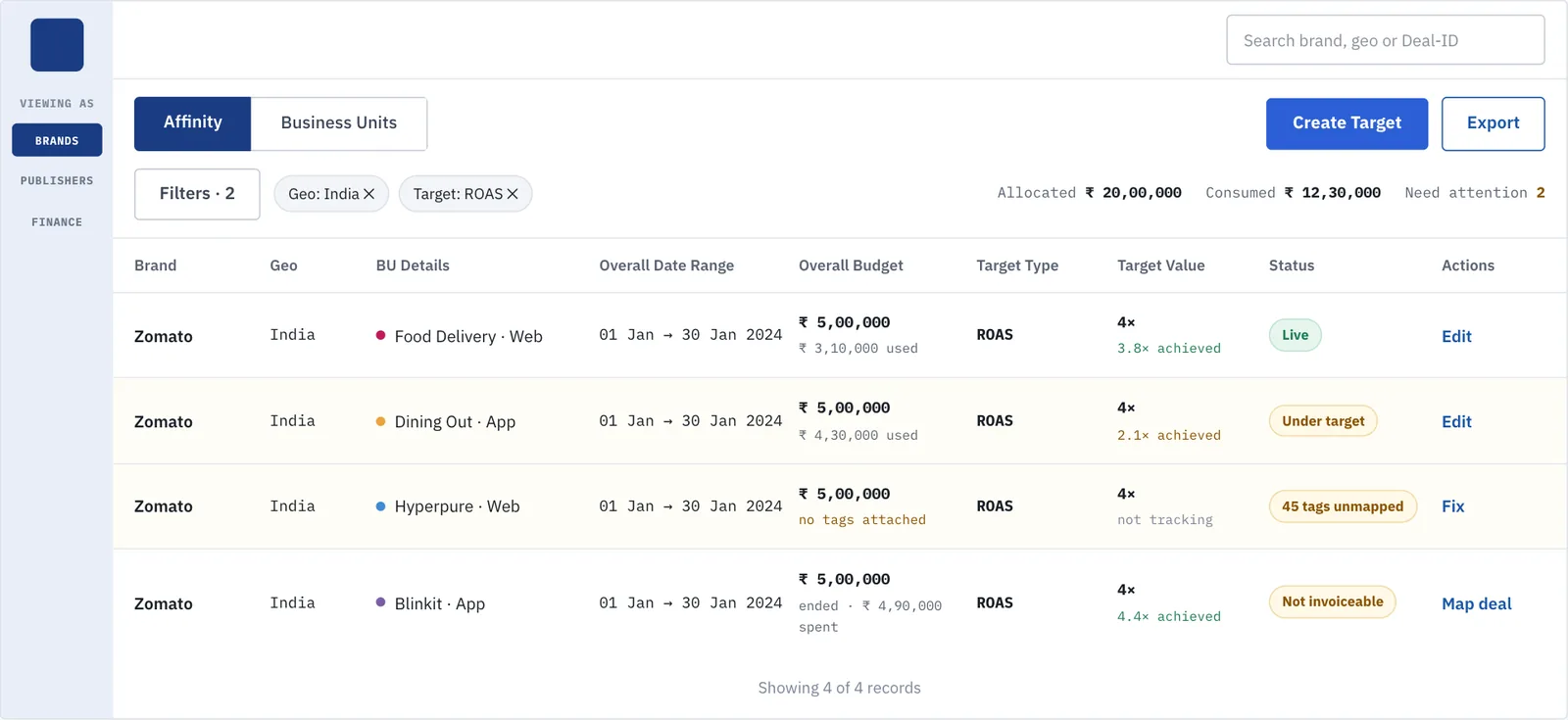
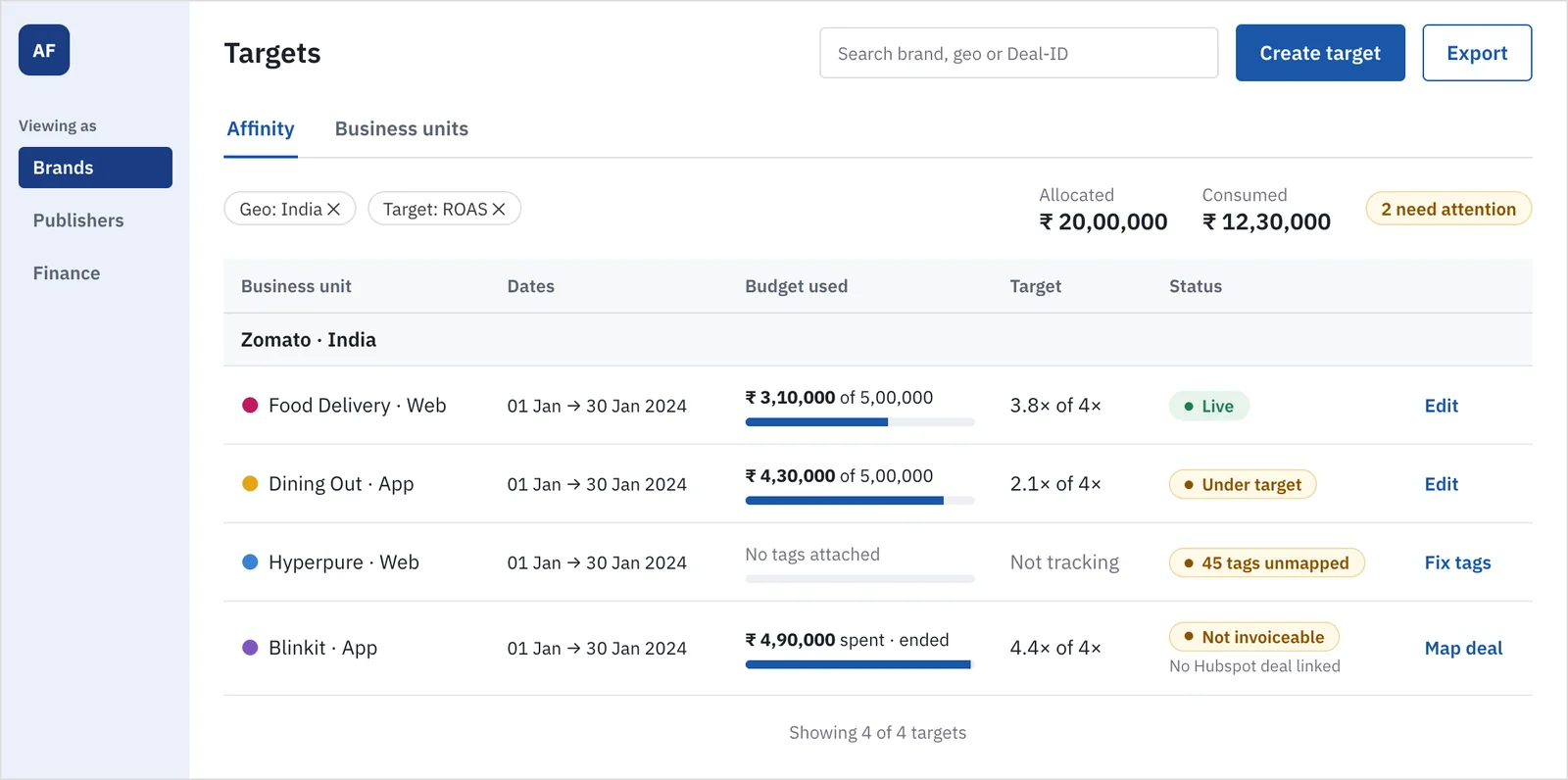
| F17 | 5 Target list | Consistency and standards | Brand repeats on every row. Actions use different verbs (Edit, Fix, Map deal). Data is dense monospace. | 2 | Rows grouped by brand. Budget gets a progress bar. Verbs name the job (Edit, Fix tags, Map deal). |
| F18 | 5 Target list | Visibility of system status | “Need attention 2” is micro text with no affordance. | 2 | An amber chip, “2 need attention”. |
21 UX laws
Each law checked against the screens, before and after.
| Law | What it asks | v1 | v2 | Evidence |
|---|---|---|---|---|
| Aesthetic-usability effect | A calm screen reads as easier to use | Partial | Pass | Consistent hairlines, spacing and one hierarchy across all five screens |
| Chunking | Group related information | Partial | Pass | Context, fields and actions are separate groups; tables hold six columns, not eight |
| Cognitive load | Remove what the task does not need | Fail | Pass | Option paragraphs and a second alert removed; details move behind info icons |
| Doherty threshold | Responses under about 400 ms | Not testable | Not testable | Needs a working prototype to time |
| Fitts’s law | Make targets large and close | Partial | Partial | Buttons are 40px and grouped right. Table links remain small |
| Goal-gradient effect | Show progress toward the goal | Partial | Pass | Stepper with done state; budget-split bar |
| Hick’s law | Fewer, clearer choices speed decisions | Fail | Pass | Four options, one expanded, one control instead of two |
| Jakob’s law | Behave like products people know | Pass | Pass | Familiar modal, radio list and table patterns |
| Law of common region | Shared background groups items | Partial | Pass | Context bar and note panels each own a region; equal-weight banners removed |
| Law of proximity | Close items are read as related | Partial | Pass | Labels sit with values; actions sit with their rows |
| Law of Prägnanz | Prefer the simplest reading | Partial | Pass | One layout per screen; duplicate headings removed |
| Law of similarity | Look-alikes behave alike | Partial | Pass | One button set, one pill style, one verb pattern |
| Law of uniform connectedness | Linked items look linked | Partial | Pass | Stepper joins the three steps |
| Mental model | Match the user’s words | Partial | Pass | “Strong match” replaces “3 of 3 signals”; “Fix tags” names the job |
| Miller’s law | Keep working memory loads small | Partial | Pass | At most six columns; one headline number instead of four |
| Occam’s razor | Remove what adds nothing | Fail | Pass | Select-plus-list and the second alert removed |
| Pareto principle | Serve the common path first | Partial | Pass | The common choice is one click; definitions are optional |
| Postel’s law | Be liberal in what you accept | Pass | Pass | Manual Deal-ID entry and partial matches are both accepted |
| Serial position effect | First and last items are remembered | Partial | Pass | The alert comes first; the primary action comes last |
| Tesler’s law | Let the system absorb complexity | Pass | Pass | Matches are suggested and Hubspot is pre-filtered by the user’s own selections |
| Von Restorff effect | The odd one out is remembered | Fail | Pass | Before: two amber banners and three blue buttons. After: one amber alert, one primary |
v1: 3 pass, 13 partial, 4 fail, 1 not testable. v2: 19 pass, 1 partial, 0 fail, 1 not testable.
Spec for Figma
What stayed the same
- Blue primary
#1A56A8, white surfaces,#DDDDDDhairlines, 4px radii, pill status chips. - Outlined fields with the label sitting on the border.
- IBM Plex Sans for UI, IBM Plex Mono for numbers and IDs.
- The amber and green status palette, the sidebar role switcher, and each screen’s overall layout.
What changed
| Element | Change |
|---|---|
| Stepper | New. Three steps with current and done states, replacing “Step 1 of 3” text. |
| Context bar | One grey bar with chips replaces two blue banners. Chips are pill, 12.5px, white. |
| Option card | Radio list. Title 15px semibold, one-line description, “Asks for” chips. Selected: 1px blue border and #F0F5FC tint, with its fields revealed inside. |
| Match meter | Three dots plus “Strong match” (green) or “Partial match” (neutral). Replaces “n of 3 signals”. |
| Note | Amber for one blocking-risk message per screen. Neutral grey for information. Outline button for actions inside. |
| Buttons | One solid primary per screen. Outline secondary. Text for Cancel and Back. Footer: back and cancel left, primary right. |
| Status pill | One pill per row with a dot. Colour: green Live, amber for anything needing action, grey for neutral. |
| Tables | At most six columns. Header 12.5px semibold on #F7F8FA. Group rows by brand. Budget gets a 6px progress bar. |
Tokens
| Token | Value | Use |
|---|---|---|
| Blue | #1A56A8 · tint #F0F5FC · dark #1A3C82 | Primary, selection, sidebar |
| Ink · muted | #1A2027 · #717182 | Text, helper text |
| Hairline | #DDDDDD · #E4E7EC | Borders, row dividers |
| Amber | #8A5300 on #FFF9E8, line #F0DCA8 | Needs action |
| Green | #1E7D50 on #E6F4EC | Live, attached, strong match |
| Type | Title 20/28 · body 14/20 · small 12.5/18 · micro 11.5/16 | IBM Plex Sans 400–700 |
| Space · radius | 4 · 8 · 12 · 16 · 24 · 32 px · 4px, pill | Layout |
Every value above is a variable in roas-ui.css, and each screen is a plain HTML file in assets/roas-ui/screens/.
Test before you trust it
Five people who set up targets (two Brand, two Publisher, one Finance), five tasks, think-aloud:
- Create a ROAS target with a 4× multiple and a ₹10,00,000 ceiling.
- Find which tags no target covers, and attach them.
- Save a fixed-cost budget for a brand with no Masterbrand.
- Link a Hubspot deal, then say why it is the right one.
- Find the targets Finance cannot invoice, and say what to do next.
Measure task success, time on task, and first-click correctness. A finding is “verified” only after at least four of five complete its task unaided.