Deep dive
ROAS target case study: the long version
The full reasoning behind the case study, kept in one scrolling page. The screens here are the first redesign (v1); the refined v2 screens, with a before-and-after UX audit, are on the audit page.
Context
Affinity runs campaigns across multiple ad products for three different roles — Brands, Publishers and Finance — each of whom needs to define or check what a campaign is trying to achieve and how it is funded, at either the Business Unit level or the Affinity level.
Six recorded rounds of iteration — Lo-Fi through Lo-Fi v5, then two Hi-Fi passes — show the team wrestling with the same core question the whole way: does each combination get its own screen, or does one flow carry all of them?
Constraints. Three roles with different jobs had to work against one shared model — a model that was itself still being defined across those six iterations. And two things a target depends on, the Masterbrand hierarchy behind a Deal-ID and the Hubspot deal Finance invoices against, belong to other teams on other clocks, so the flow could not assume either was ready.
The reframe
The question the team kept asking: Which screen does each combination get?
The question that unlocked it: How many choices does one person actually make?
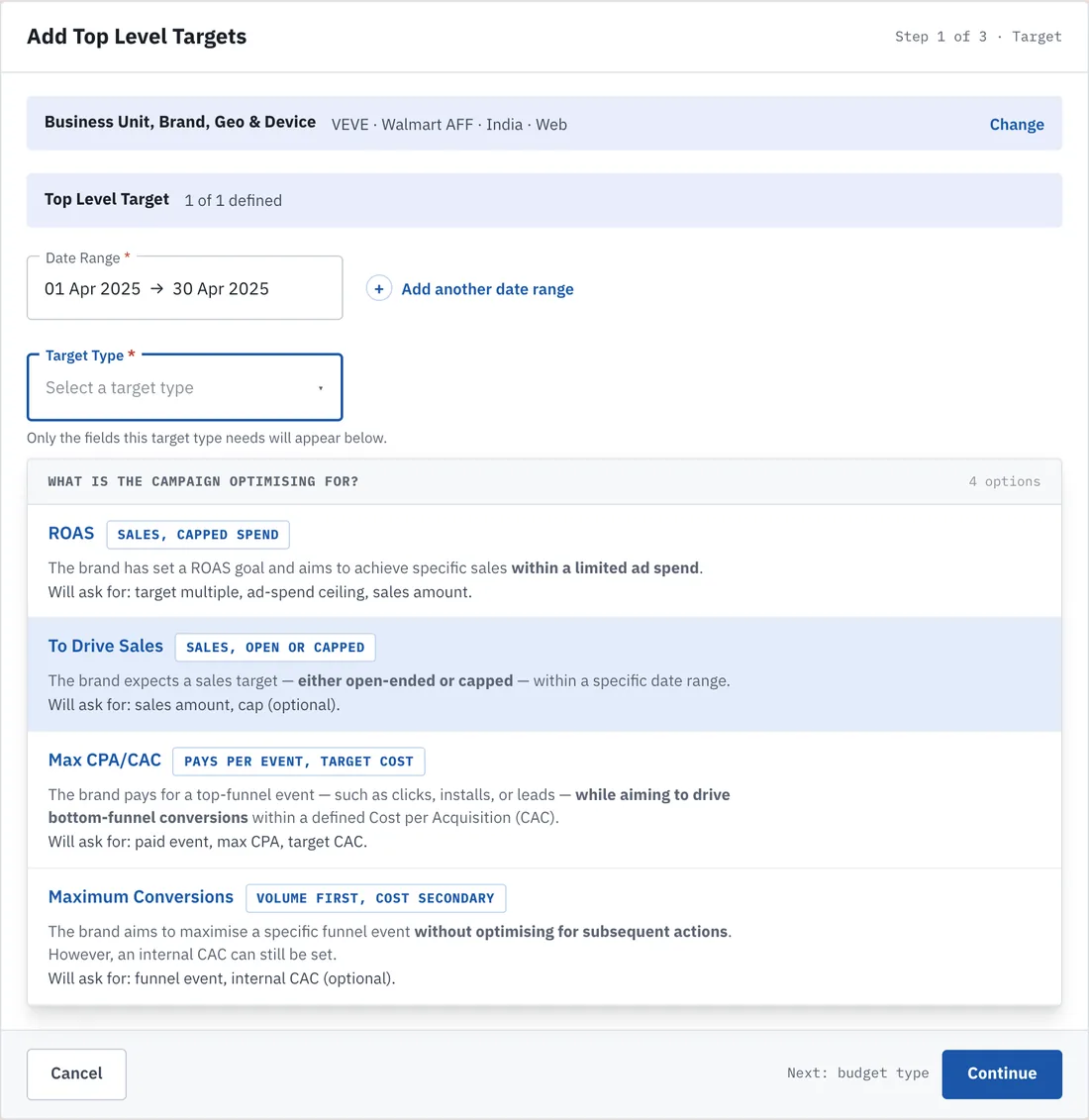
Thirty-two valid combinations looks like thirty-two screens only if you count what the system supports instead of what a user decides. The redesign splits selection into two questions — what are you optimising for, then how is it funded — turning sixteen upfront combinations into two choices of four, with fields revealed only as they become relevant.
Principles that settled the trade-offs
1. One model, many roles. Brand, Publisher and Finance work against one shared configuration surface with a role switcher — a single source of truth on what a target and its budget mean — rather than three bespoke dashboards.
2. Never block on a dependency the user can’t fix. The Masterbrand hierarchy and the Hubspot deal belong to other teams. The flow offers likely matches, or saves in a named, visible state, instead of halting.
3. State the consequence, not just the status. The uncovered tag count leads the counter row; an unmapped deal reads “Not invoiceable” — in Finance’s language, with an owner and an action.
Setting a target
Decision 1. One configuration flow with conditional fields, instead of a screen per target/budget combination
- The tension
- Each of the 4 target types needs different inputs — a ROAS type needs an ad-spend ceiling, a CPA type needs an event definition and CAC, a sales type needs a date range — but a screen-per-combination approach means 16+ near-identical flows to build, maintain, and re-teach the user every time they pick a different type.
- What I rejected, and why
- A dedicated wizard per target-type/budget-type pairing — the default most enterprise ad platforms fall into — was rejected because it multiplies engineering and QA surface area 16× for a config object that is structurally the same shape underneath.
- What I did instead
- A single Create Top Level Target flow where Target Type and Budget Type selection at the top conditionally reveals only the relevant fields below. In the redesign the selection step itself is split in two — what are you optimising for , then how is it funded — which turns 16 upfront combinations into two choices of four, and the confusable pair is renamed so the labels carry the distinction the definitions were doing alone.
- What it moved
- Thirty-two valid combinations ship as one create/manage flow — one configuration, not one screen — in place of 16+ near-identical wizards to build, test and re-teach.
Decision 2. A live tag inventory instead of a flat tag list
- The tension
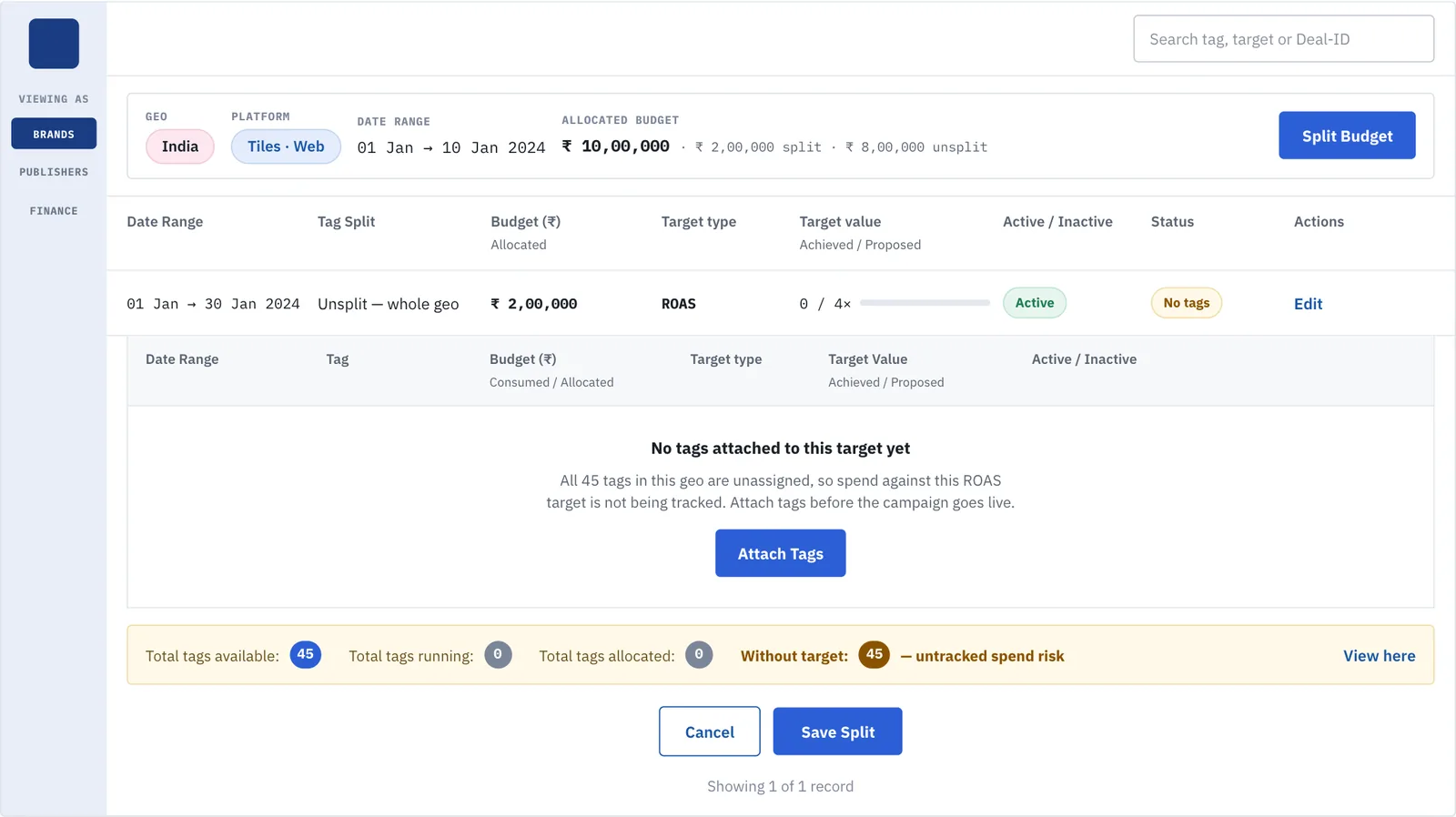
- Targets get mapped to campaign tags for tracking, but once dozens of tags exist across many targets, a flat list gives no way to see which tags are actually covered by a target and which are silently orphaned.
- What I rejected, and why
- A simple free-text or flat-list tag field — the lightest possible implementation — was rejected because it hides exactly the coverage gap this system exists to prevent.
- What I did instead
- Tags are tracked as persistent, always-visible counters — total available, running, allocated, with target, and without target — so a coverage gap is visible before a campaign launches, not discovered after spend has already gone out untracked. The redesign moves those counters above the table instead of below it, states the uncovered count as the headline number rather than one figure among five, and gives the empty table an actual empty state.
- What it moved
- A coverage gap shows up before a campaign launches: the count of tags without a target is the headline number, not one of five, so orphaned tags are caught before spend goes out untracked.
Getting it billed
Decision 3. Guided in-place recovery instead of a blocking validation error
- The tension
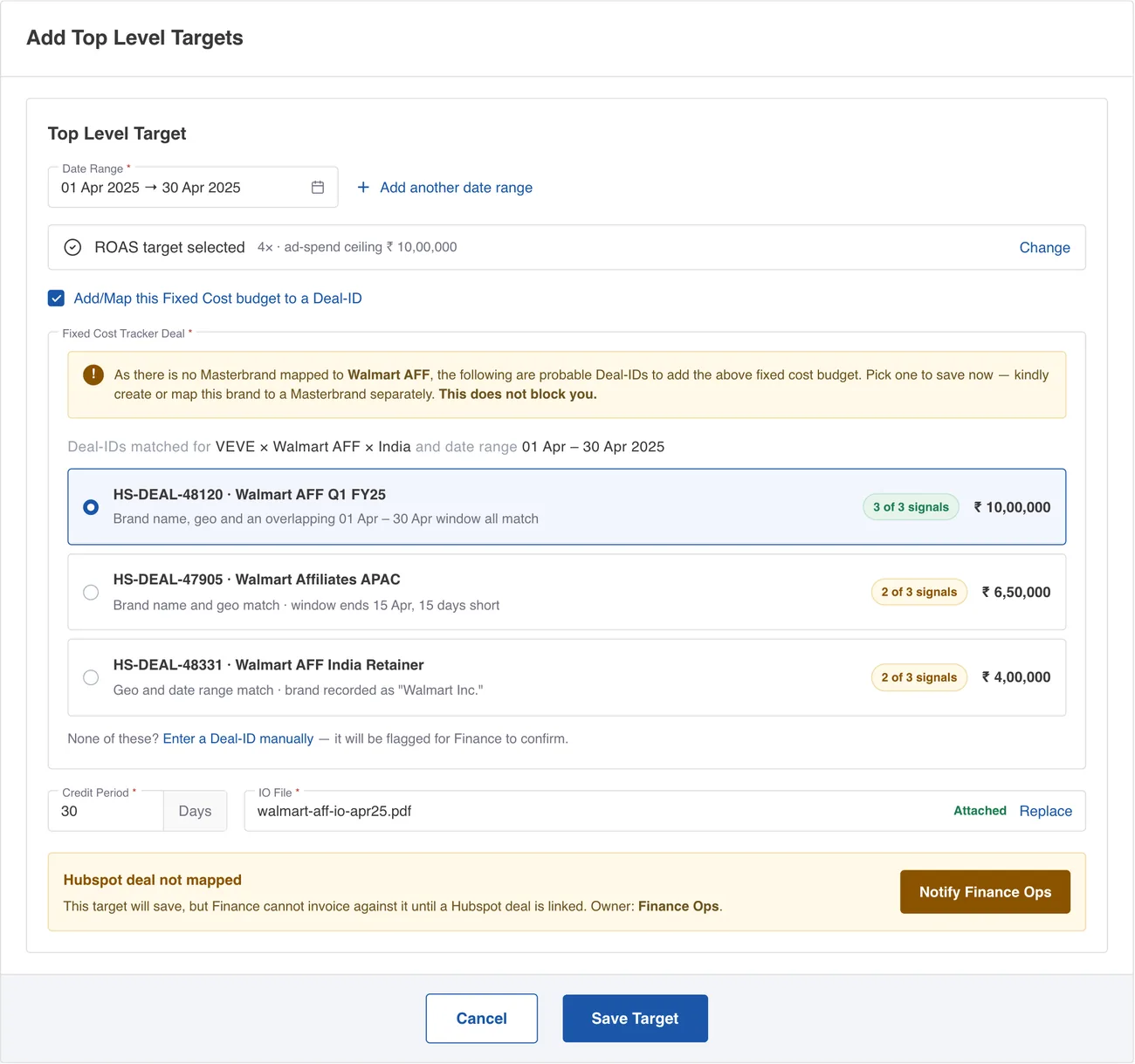
- A Fixed Cost budget has to map to a Deal-ID, but Deal-IDs live under a Masterbrand hierarchy that a brand-new brand will not have set up yet — and the person entering the budget usually is not the person who owns that hierarchy.
- What I rejected, and why
- A hard validation error that stops budget entry until someone else fixes the Masterbrand mapping elsewhere in the org was rejected — it turns one person's task into a cross-team blocker with no visible next step.
- What I did instead
- Inline copy that names the exact gap and gives an immediate path forward: "As there is no Masterbrand mapped to {this brand}, following are probable Deal-IDs to add the above fixed cost budget. Kindly create or map this {Brand} to a Masterbrand." The system suggests likely Deal-IDs rather than leaving the user to solve the hierarchy problem cold. The redesign makes good on that — the suggestions are actual selectable rows with the evidence behind each match, and the unmapped-Hubspot state carries an owner and an action instead of standing as a bare label.
- What it moved
- Someone entering a budget for a brand with no Masterbrand mapped still has likely Deal-IDs in front of them, and the note says plainly that it does not block — so one person’s task never becomes a cross-team blocker.
Decision 4. Bring the Hubspot deals into the form, and make an unmapped target a tracked state rather than a blocked one
- The tension
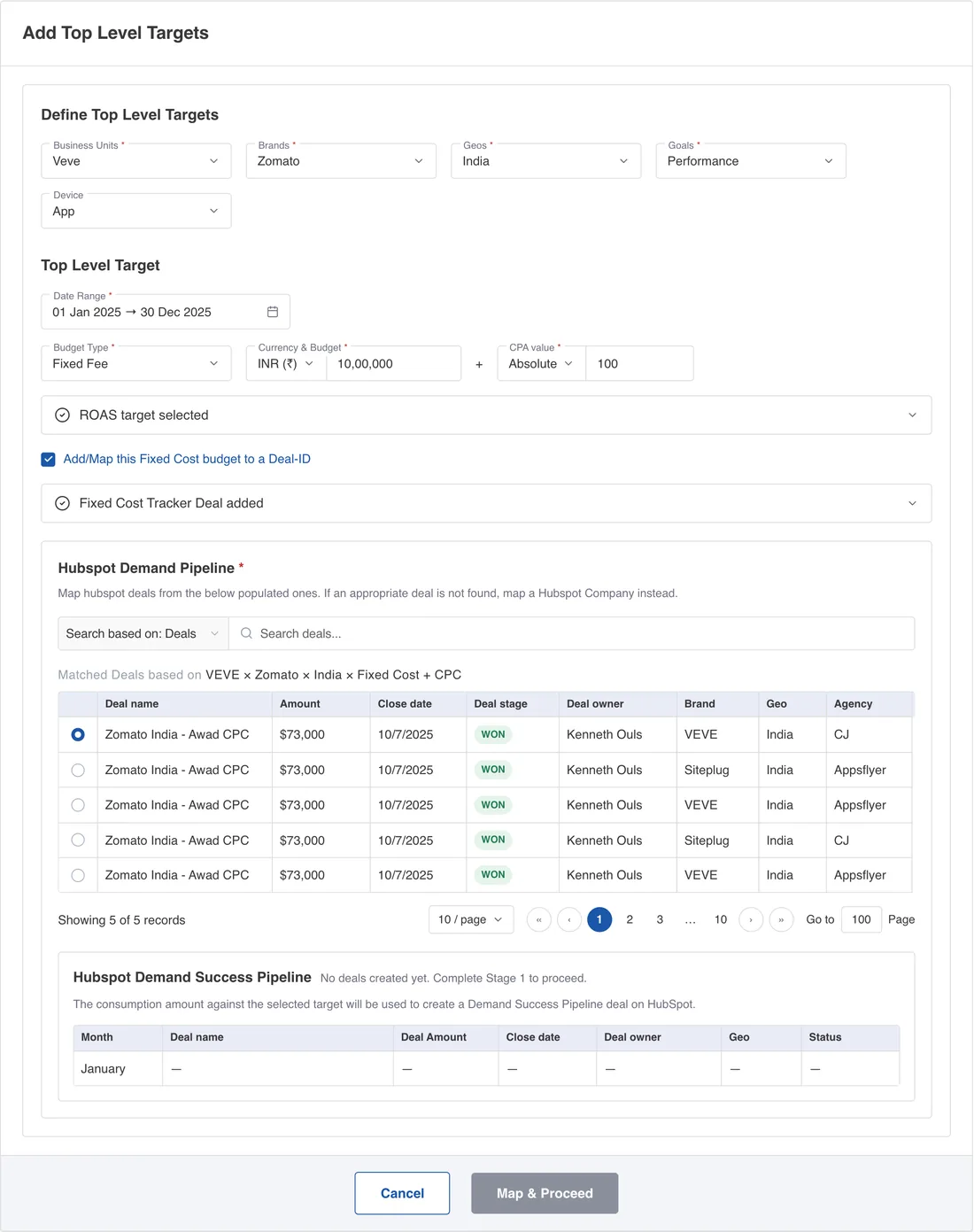
- A target is configured by media and ad-ops, but Finance cannot invoice against it until it is linked to a Hubspot deal — and the consumption recorded here becomes the amount invoiced there. Mapping the two means holding both records side by side: the target’s business unit, brand, geo, budget type and date window against a CRM record’s brand, geo, stage, owner and amount. The systems are owned by different teams on different clocks, so at the moment a target is created the deal is often either hard to identify among near-identical ones, or does not exist yet.
- What I rejected, and why
- Three things. A deal-ID text field with a link out to Hubspot is cheapest to build and moves the whole matching problem onto the user — open a second tab, search a CRM they may not have access to, copy an ID back — and it produces the failure with no signature: a valid ID pointing at the wrong deal, which nothing downstream can catch. Making the deal a hard required field would hold a live campaign hostage to another team’s CRM hygiene. And letting the target save behind a quiet internal flag, which is what the shipped "Hubspot Deal Not Mapped" label amounted to, pushes the gap to month-end invoicing, after the spend has gone out.
- What I did instead
- The form pre-filters Hubspot on the selections already made above and presents the result as a table, so the choice is a single-select among candidates rather than free recall. The filter states its own criteria in the header — VEVE × Zomato × India × Fixed Cost + CPC — so a user seeing no matches knows which selection to widen instead of assuming the integration is broken. Each row carries the fields that actually discriminate between similar deals: amount, close date, stage and owner. Search stays available and is scoped explicitly to Deals, with Company as the documented fallback. Below it, the Demand Success Pipeline table shows what the mapping will produce month by month, so the consequence is legible when the decision is made rather than at the first invoice. And when no deal exists yet, the target saves anyway: the unmapped state becomes a first-class condition that names its consequence in Finance’s language and persists onto the target row in the list as Not invoiceable , visible to every role on the screen they already open.
- What it moved
- An unmapped target saves anyway and carries “Not invoiceable” onto its row — visible to Brand, Publisher and Finance on the screen they already open — instead of surfacing at month-end invoicing.
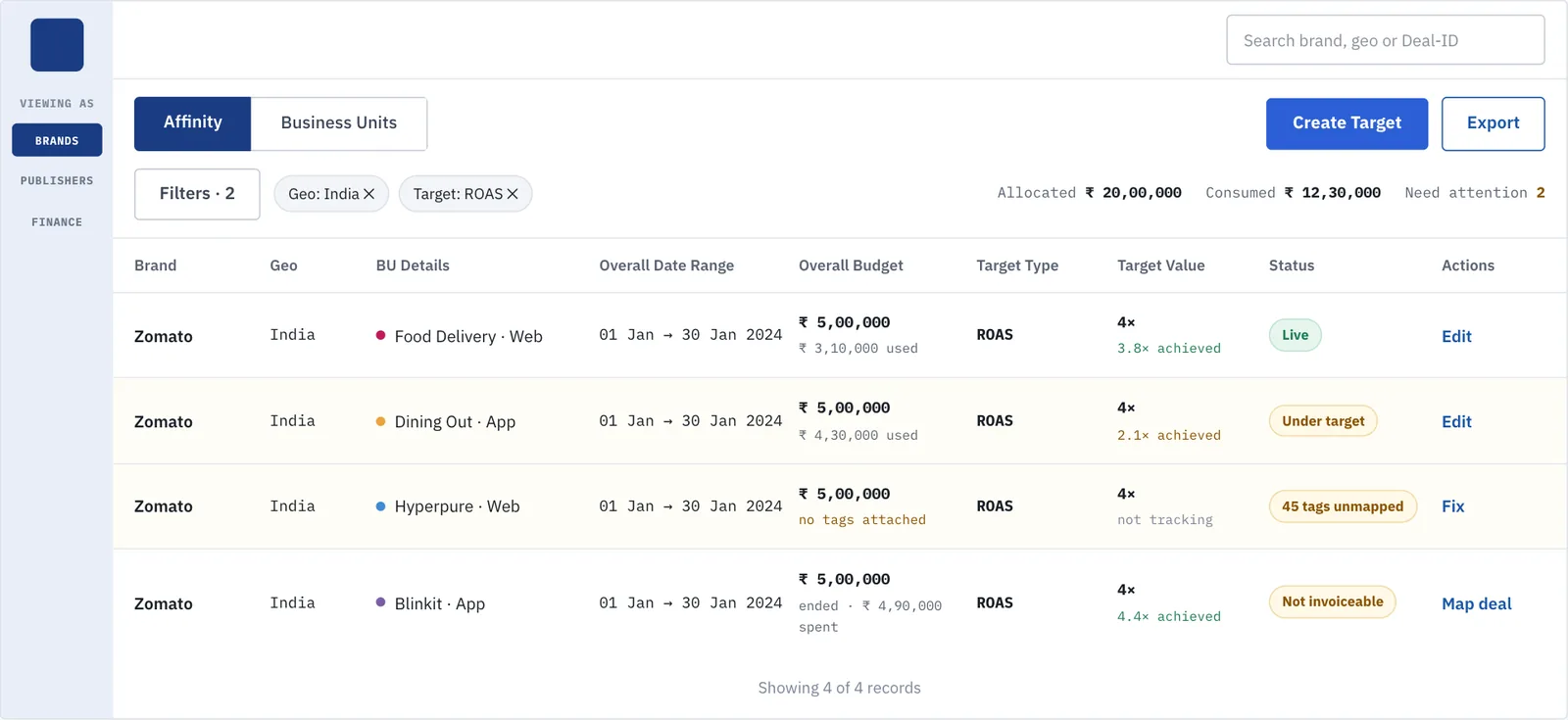
Target list: status column filled in
This is the screen all three roles land on, and in the shipped build it was the weakest: four visually identical rows, a blank Status column, a blank Actions column, unlabelled buttons, reversed date ranges, and the only differentiator rendered as a wordless coloured pill. None of that needed a new feature to fix — it needed the data the table already had to be shown.
Strategic considerations: what I deliberately did not build
We considered giving each of the three roles — Brands, Publishers, Finance — a fully separate, purpose-built dashboard tailored to exactly what that role needs to see. We ruled it out for this release: all three work against one shared configuration surface with a role switcher, trading per-role customization for a single, consistent source of truth on what a target and its budget actually mean, while the underlying model itself was still being defined across six iterations.
Supporting evidence
Design system discipline
A dedicated internal canvas documents type scale, colour tokens (Blue, Mauve, Neutral ramps) and a full icon set. The platform's shell — Mini Side Bar, Profile, Menu drop down — appears identically nested under dozens of otherwise-unrelated screens across every product line, confirming the consistency was not accidental.
Visible iteration — test-and-learn cycles
Six named rounds — Lo-Fi through Lo-Fi v5, then Hi-Fi v1 and a later Hi-Fi changes pass — each restructuring the target/budget flow, are preserved rather than discarded. That progression is itself the evidence for how the 4×4×2 model got simplified into one flow rather than being designed that way from the start.
Domain-correct language
Inline definitions for all four target types are written in the exact vocabulary brand and media teams use — ROAS, CAC, CPA, top-funnel versus bottom-funnel — rather than generic platform-speak. This is what "match between system and the real world" looks like for an enterprise ad-tech audience.