Cross-functional leader

One inventory, two sides, and a safe way to change it.

Publisher inventory management · Associate UX Designer · Team of 5: 2 developers, 1 UX designer, 1 product manager, 1 QA · 3½ months

2 sides

Demand and supply, each with its own listing and tag views

design fact

4

Products across two business units: Tiles, Impact, SiteSuggest, SiteDiscover

design fact

−33%

Effort to find designs, documents and creatives

estimate from user and PM feedback, not measured

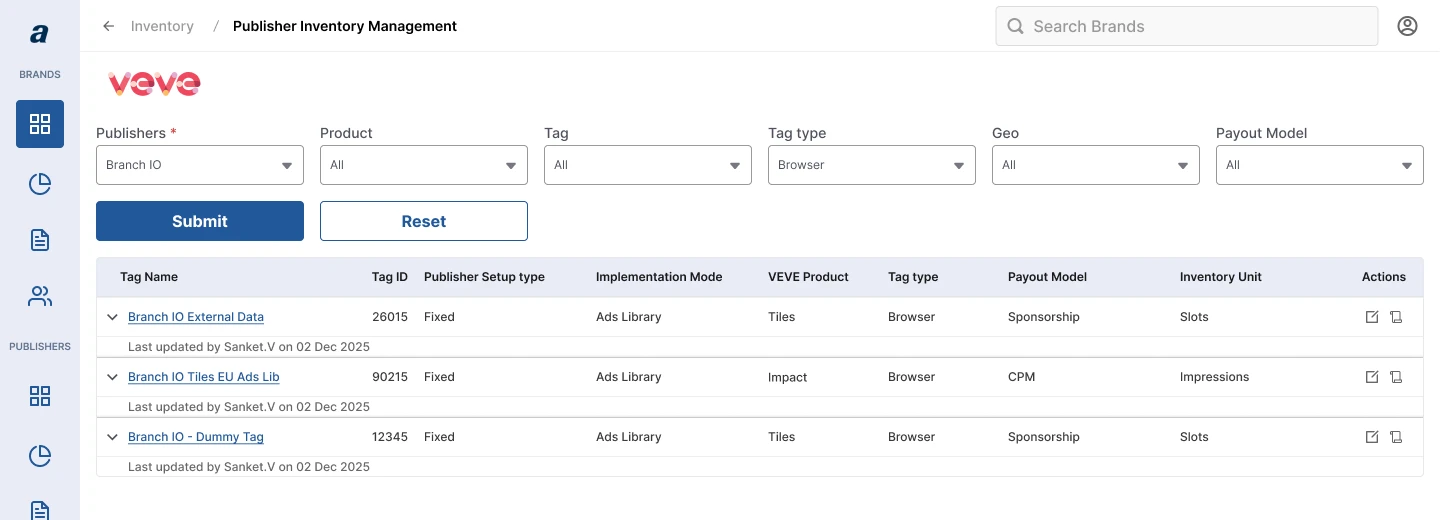
Supply-side Publisher Inventory Management for VEVE: filters for Publishers, Product, Tag, Tag type, Geo and Payout Model above a table of tags with expandable rows.
Supply-side listing for VEVE. Figma screen.

The problem

Publisher inventory is where publishers keep their creatives, drafts, brand portfolios and more. Advertisers need to read it, operators need to change it, and each business unit tracks different details. It was spread across tools that each held part of the truth, so people reconciled it by hand. That delayed campaigns, cost operator time, and risked the wrong creative or draft going live. A team of five had 3½ months to fix it.

Two questions shaped the redesign.

A

Find

What does each side need to see?

Decision 01

Say where each number comes from

Tension
Some columns are typed in by people and some are computed, and a table of numbers does not say which.
Rejected
A legend or tooltip alone, which is easy to miss, and an icon on every cell, which is noisy.
Result
A legend names the two states and tinted headers mark them. Ranking and Fraud Score are labelled Coming Soon instead of left blank.
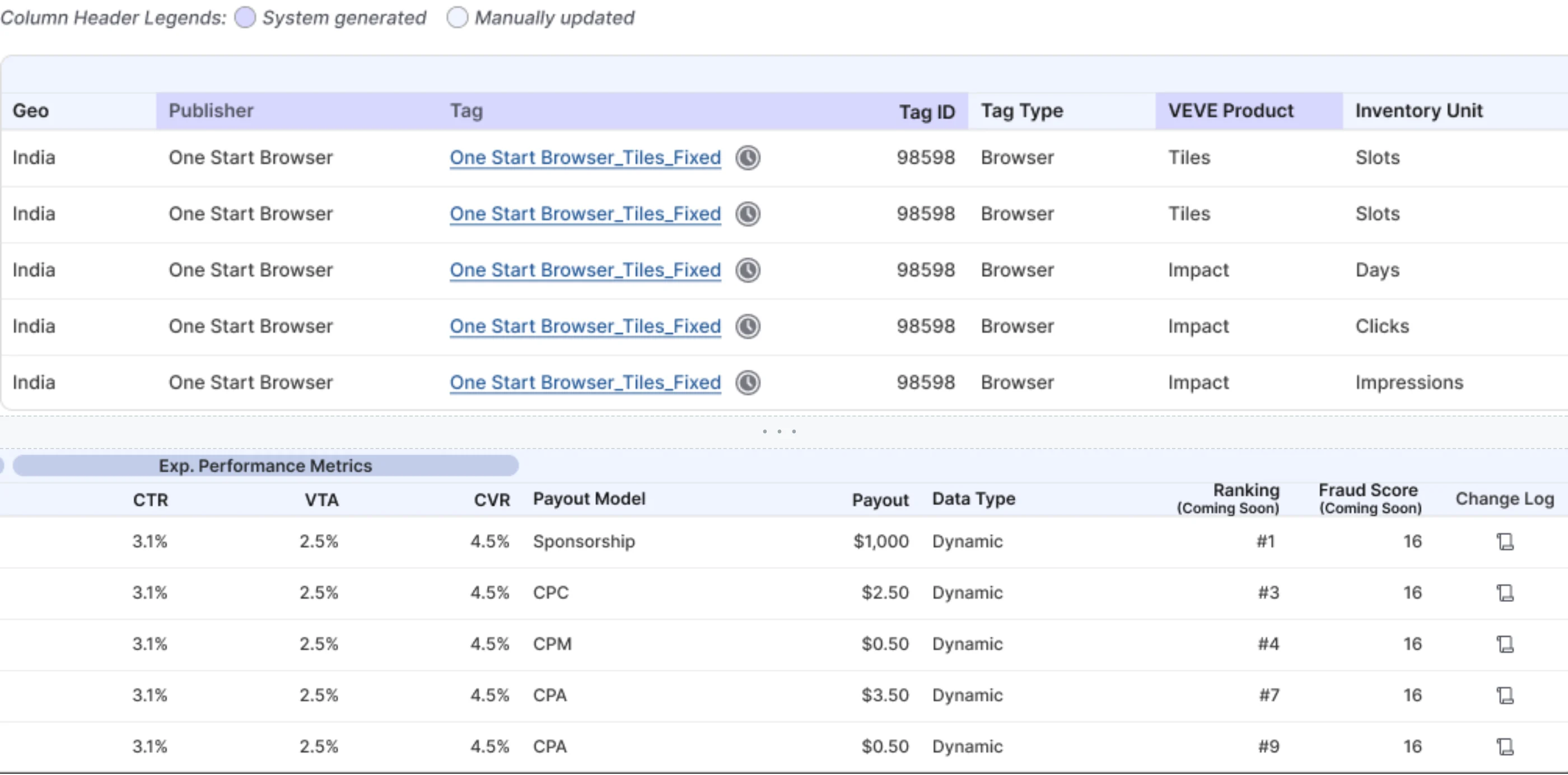
VEVE demand-side listing. A legend reads System generated and Manually updated. Column groups are Inventory Details, Active Users, Exp. Impressions and Exp. Performance Metrics. Ranking and Fraud Score headers say Coming Soon.
1Legend for system and manual columns2Coming Soon, not an empty columnFigma screen.

Decision 02

Give each business unit its own table

Tension
VEVE counts slots and impressions. Siteplug counts brands and clicks and adds request metrics.
Rejected
One shared table for every business unit. Each has its own setup and its own details.
Result
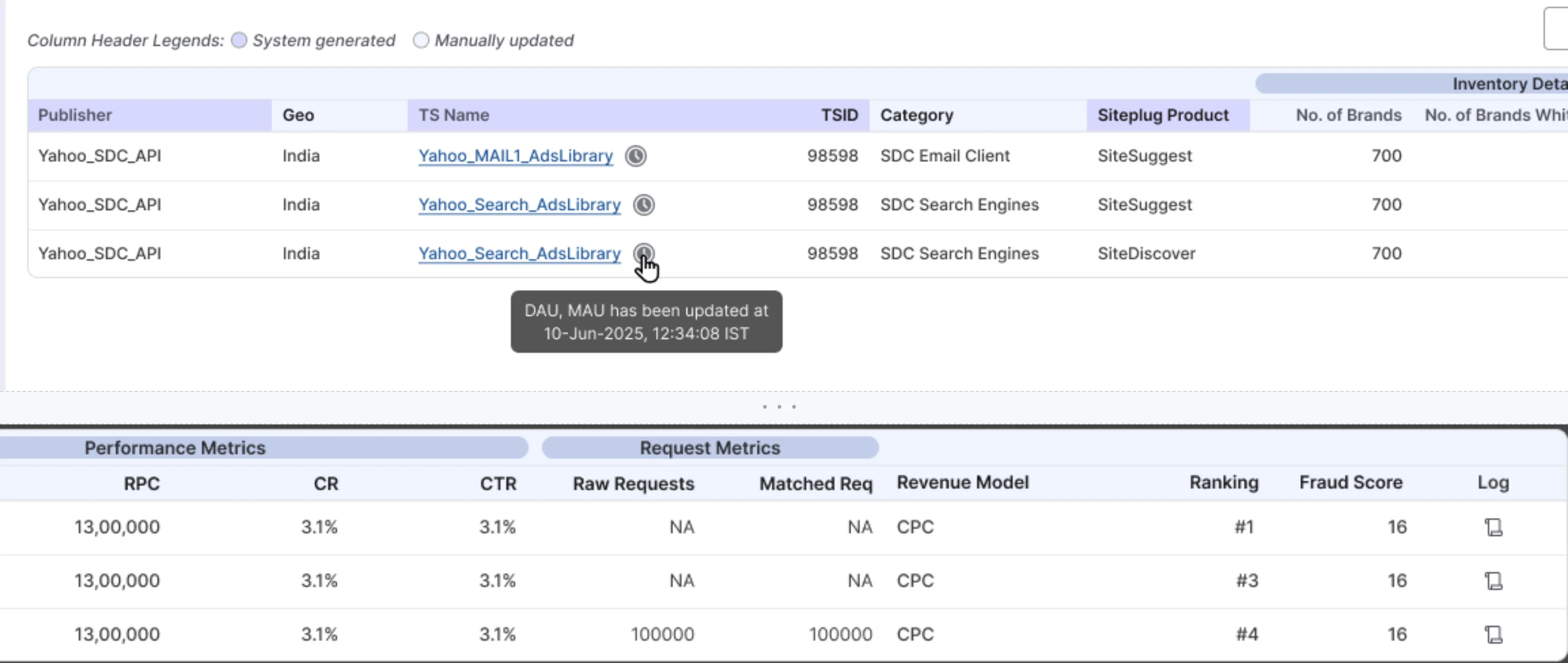
Each table keeps its own column groups and filters. A small icon on a tag shows when its figures last changed.
Siteplug demand-side listing. Columns include Siteplug Product, Inventory Details with number of brands, Active Users, Performance Metrics and Request Metrics. A tooltip reads that DAU and MAU were updated on 10 June 2025.
1Per-tag update tooltip2Request metrics only on SiteplugFigma screen.

Tag read view

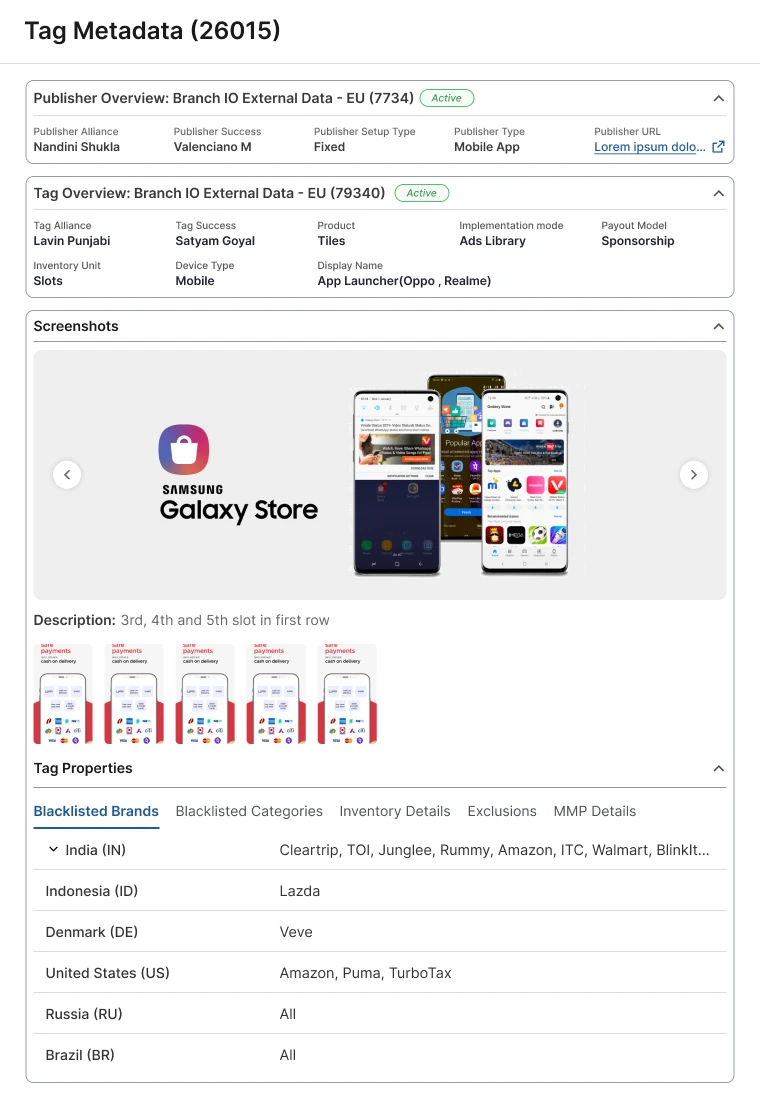
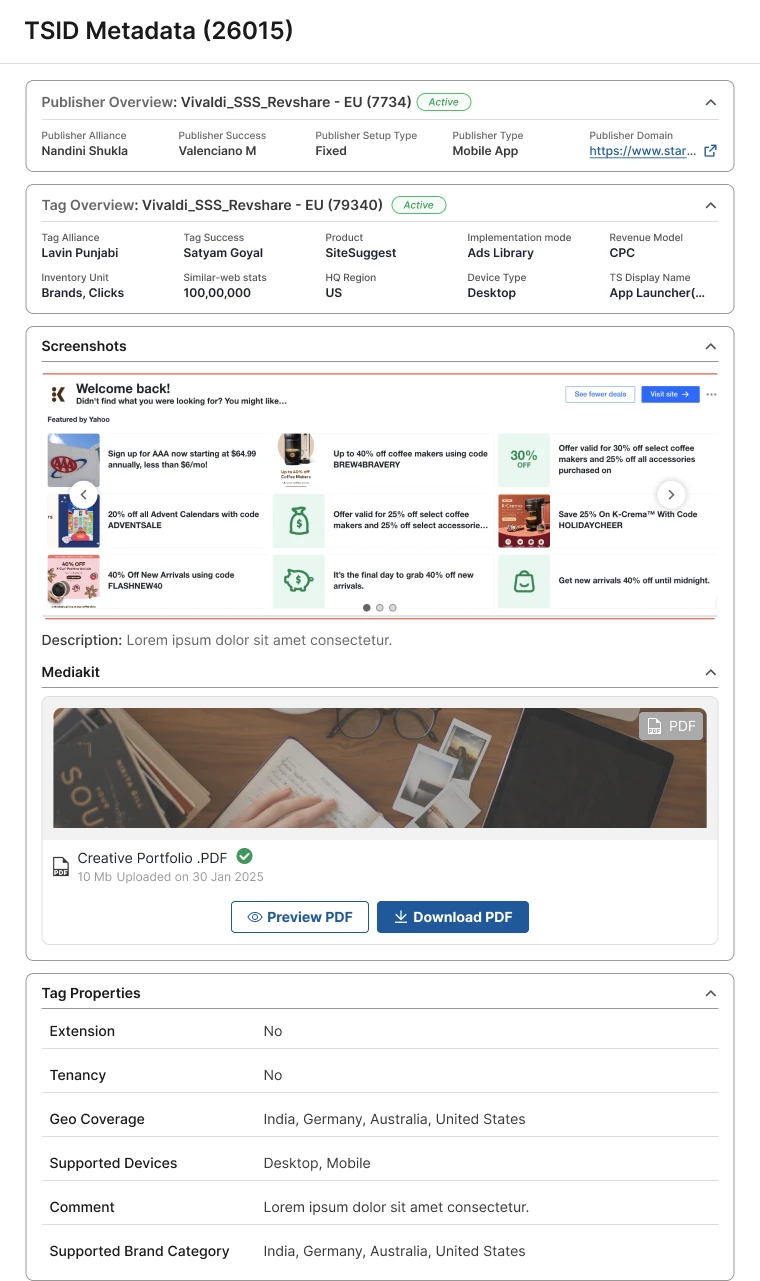
Opening a tag shows everything about it in one drawer: who owns it, what it is, what the placement looks like, and its limits. Sections collapse, and the Mediakit previews or downloads as a PDF.

Tag Metadata drawer for tag 26015: publisher overview, tag overview, a screenshot carousel with a slot description, and tag properties in tabs for blacklisted brands, categories, inventory details, exclusions and MMP details.
Tag Metadata drawer. Figma screen.
Tag Metadata drawer for a Siteplug tag with a Mediakit section: a PDF named Creative Portfolio, 10 MB, uploaded 30 January 2025, with Preview PDF and Download PDF buttons.
Siteplug tag with a Mediakit. Figma screen.

B

Change

Is it safe to change a tag?

Decision 03

Save each section on its own

Tension
A tag drawer holds publisher details, tag details, screenshots, exclusions and feature flags.
Rejected
A save per field, and auto-save with undo, where it is unclear when a change is final.
Result
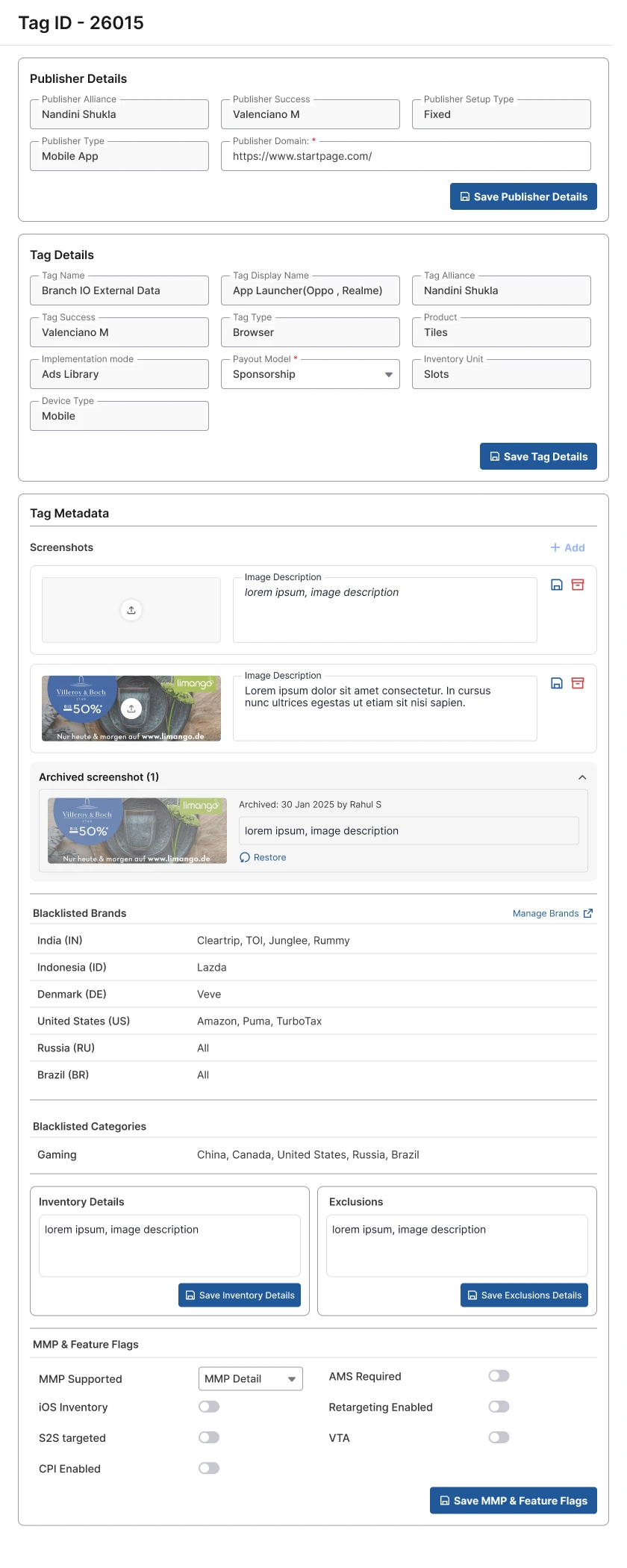
Each section has its own Save button and saves only what it contains. Screenshots save one at a time.
Supply-side tag edit drawer for tag 26015. Publisher Details, Tag Details, Tag Metadata with screenshots, Inventory Details, Exclusions and MMP and Feature Flags each end in their own Save button.
1Save Tag Details2Save Inventory DetailsFigma screen.

Decision 04

Archive instead of delete

Tension
Tag and geo details, brochures and creatives are reused for other geos and for campaign reruns.
Rejected
Deleting what is no longer active, which throws away material the next campaign or geo can reuse.
Result
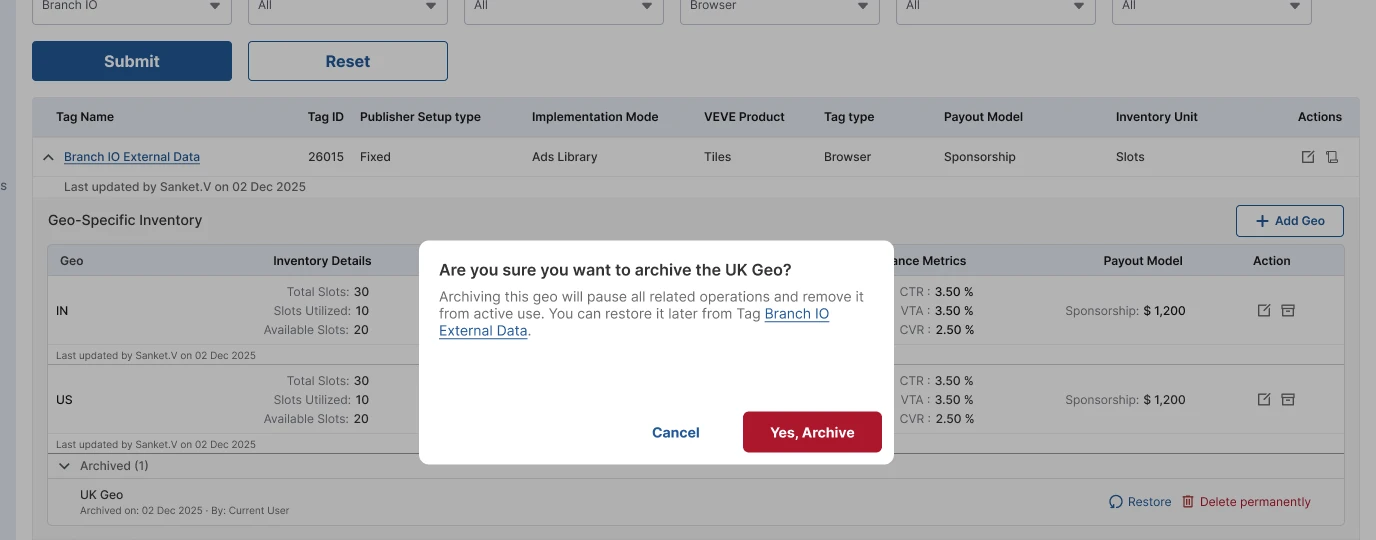
Archiving pauses a geo and keeps its details. Archived geos and screenshots stay listed with Restore. Delete permanently is a separate action, and every tag keeps a change log.
Archive confirmation reading Are you sure you want to archive the UK Geo, over a geo list. An Archived (1) row shows UK Geo with Restore and Delete permanently actions.
1Archive confirms what pauses2Restore, with delete kept apartFigma screen.

What I did not build

Ranking and Fraud Score are not live yet, so both columns say Coming Soon. I considered hiding them until they were ready, and delaying launch until both were. Hiding meant nobody would learn they were coming. Delaying would have held back everything else. The label trades a table that looks finished for one that tells the truth and ships on time.

Result

Publishers upload drafts, creatives, brochures and designs, with the brand and campaign information that goes with them, in one place. Their teammates find it and keep track of it.

The effort figure above comes from verbal feedback from users and product managers. It was not measured. Users and product managers gave a second estimate, a 43% cut in the effort to gather a publisher’s campaign information, the same way. No formal measurement exists.